
Ricoh Copiers
Compare
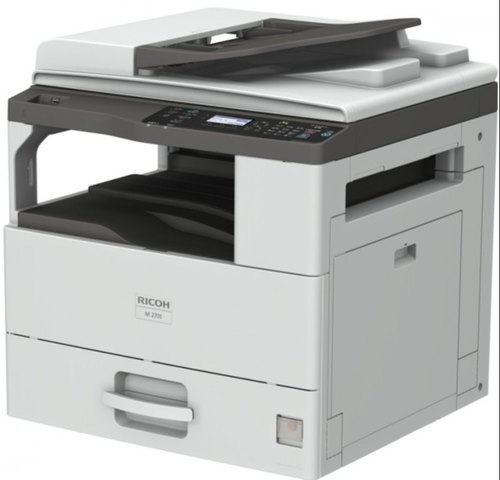
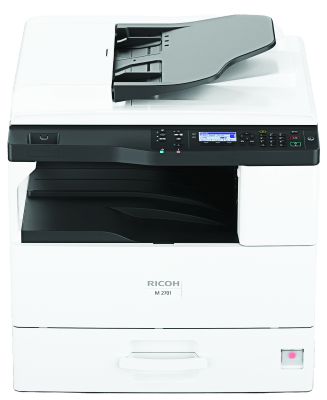
Ricoh M 2701
Functions: Copy, print, scan | Colour: No | Storage: Not available | Memory – standard: 512 MB | Operation panel: 4-line LCD | Physical dimensions (WxDxH)—mainframe: 587 x 581 x 639 mm | Weight—mainframe: 39 kg or less | Standard input capacity (sheets): 600 | Maximum input capacity (sheets): 1,600 | Standard output capacity (sheets): 250 | Maximum output capacity (sheets): 250 | Paper input configuration – standard: 500-sheet paper input tray, 100-sheet bypass tray, 50-sheet ARDF
| Functions | Copy, print, scan |
|---|---|
| Colour | No |
| Storage | Not available |
| Memory – standard | 512 MB |
| Operation panel | 4-line LCD |
| Physical dimensions (WxDxH)—mainframe | 587 x 581 x 639 mm |
| Weight—mainframe | 39 kg or less |
| Standard input capacity (sheets) | 600 |
| Maximum input capacity (sheets) | 1,600 |
| Standard output capacity (sheets) | 250 |
| Maximum output capacity (sheets) | 250 |
| Paper input configuration – standard | 500-sheet paper input tray, 100-sheet bypass tray, 50-sheet ARDF |
| Paper output configuration – standard | 250-sheet output tray |
| Maximum paper size | A3 |
| Media weight (g/m2) | 52–216 |
| Interfaces – standard | 10Base-T/100Base-Tx/1000Base-T (Gigabit Ethernet) USB 2.0 Type B |
| Interfaces – optional | IEEE 802.11a/b/g/n/ac (Wireless LAN) |
| Network protocols – standard | TCP/IP |
| Copy speed | 27 cpm |
| First copy time | 6.5 seconds or less—via platen 12 seconds or less—via ARDF |
| Copy resolution | 100 x 100 dpi,150 x 150 dpi, 200 x 200 dpi (default), 300 x 300 dpi, 600 x 600 dpi |
| Zoom range | 25%–400% |
| Enlargement ratios | 115%, 122%, 141%, 200%, 400% |
| Reduction ratios | 93%, 82%, 71%, 50%, 25% |
| Duplex copy | Standard |
| Book copy | Not available |
| ID card copy | Supported |
| Print speed black and white | 27 ppm |
| First print time | 6.5 seconds or less |
| Print resolution | 600 x 600 dpi |
| Page description languages (PDLs) | GDI |
| Printer drivers | DDST |
| Duplex printing | Standard |
| Mobile printing | AirPrint, Mopria® |
| Scan speed | 18 ipm—black and white 14 ipm—black and white with TWAIN 6 ipm—colour |
| Scan methods | Scan to email, Scan to folder (SMB), Scan to USB/SD |
| Colour scanning | Standard |
| Scan resolution | 100 x 100 dpi, 150 x 150 dpi, 200 x 200 dpi (default), 300 x 300 dpi, 600 x 600 dpi |
| Scan to file types | Black and white Single- and multi-page PDF Single- and multi-page TIFF Colour Single- and multi-page PDF Single-page JPEG |
| Scan to email | Protocols SMTP gateway, TCP/IP Authentication SMTP authentication, POP before SMTP authentication Scan resolution 100 dpi, 150 dpi, 200 dpi (default), 300 dpi, 600 dpi Scan to email file types True colour, greyscale JPEG, PDF Black and white TIFF, PDF |
| Scan to folder | Protocols SMB Security LANMan 1.0, NTLM v1/v2, GSS API Resolution 100 dpi, 150 dpi, 200 dpi (default), 300 dpi, 600 dpi Search for client folders By name and ID Scan to folder file types True colour, greyscale JPEG, PDF Black and white TIFF, PDF |
| TWAIN scanning | Scan resolution 75 dpi, 100 dpi, 150 dpi, 200 dpi, 300 dpi, 600 dpi Scan mode True colour, greyscale, black and white |
| Authentication | Wireless LAN security (WEP, WPA) |
| Windows | Windows Server 2008 Windows Server 2008 R2 Windows Vista Windows 7 Windows Server 2012 Windows Server 2012 R2 Windows 8.1 Windows 10 Windows 2016 |
| Standard | Web Image Monitor |
| Power source | 220–240 V, 50/60 Hz, 8 A |
| Power consumption | 1,480 W—maximum operating 420 W—printing 93 W—Ready Mode 23 W—Low Power Mode 0.97 W—Energy Saver Mode (Sleep Mode) 19 W or less—ARDF |
| Typical Electricity Consumption (TEC) | 1,180 Wh |
| Warm-up time | 19 seconds or less |
| Power saving mode | 30 minutes—Low Power Mode (default) 58 minutes—Energy Saver Mode (Sleep Mode) (default) |
| Recovery time | 10 seconds or less—Low Power Mode 13 seconds or less—Energy Saver Mode (Sleep Mode) |
| Focus on Forward | We bring people and technology together to simplify complexity, embrace diversity, overcome obstacles and help you uncover opportunity. So you can focus on moving forward. |
| Customer stories | See an improved work life through the eyes of our customers – what they imagined, how they changed and the results. |
| News | Discover the latest developments and innovations from Ricoh. |
| Insights | The latest articles and analysis from our experts and thought leaders. |
| Dynamic workplace intelligence | Build your workplace of tomorrow with today’s intelligence. |
| About Ricoh | About Ricoh Ricoh imagines what the future could bring, and embraces change driven by imaginative thinking. As a truly global technology provider, we believe in improving work life through creativity, collaboration and seamless technology to empower digital workplaces. Read more Read more Ricoh way Careers Corporate overview Environment and sustainability Empowering digital workplaces Awards |
| Contact Us | Contact Us Ricoh Asia Pacific is a regional headquarter based in Singapore, covering and supporting the marketing and sales activities in the Asia Pacific region. Our extensive network of sales companies and distributors ensures that our customers get the support they need, anytime, anywhere. Get in touch Get in touch Where to buy Contact Ricoh Where to buy |
| Easy setup and maintenance | Preassembled PCDU simplifies the process of setting up the device without requiring the support of a technician. |
| Improved usability and productivity | Maximum 1,600-sheet paper input capacity enables longer uninterrupted printing. |
| Security in our DNA | Document confidentiality can be maintained by suspending print jobs, and only be released when authentication is done at the device. |
| Connectivity options | Support Mopria ® and Apple AirPrint ® which easily and seamlessly print from, or scan to, Android and iOS mobile device. |
| Brand | Ricoh |
|---|
There are no reviews yet.